
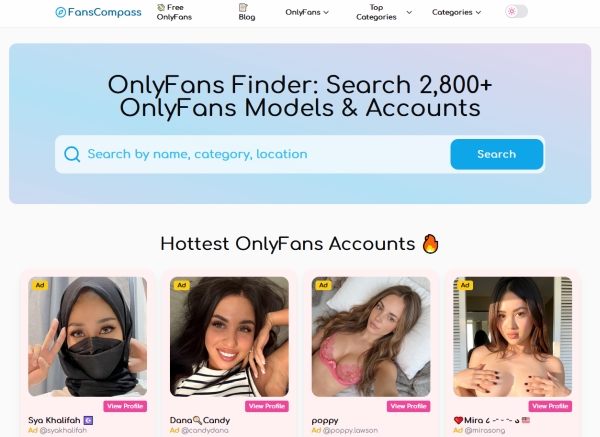
Most fans no longer subscribe on impulse. They search, compare and check before paying, the same way they would before booking a hotel or buying a gadget. This article explains why that habit has formed, what fans look for, and how to use a search tool without relying on it blindly.
Subscribing blind is an expensive habit
An OnlyFans search engine solves a simple problem: OnlyFans is built around subscribing to creators a fan already knows about, and its own tools for browsing by niche, location or price are limited. Without a way to compare, fans end up subscribing based on a single social media post and finding out what they paid for only after the charge has gone through.
That approach gets expensive quickly. Creators set monthly subscription prices from $4.99 to $49.99, and paid subscriptions renew automatically unless the fan switches auto-renew off. A few subscriptions picked on a whim can quietly turn into a sizable monthly bill.
Directories and search tools fill the discovery gap
Search engines are not the only tool fans use. Creator directories and profile sites such as https://onlypedia.io/ give fans written background on a creator before they pay, which suits people who would rather read a short description than scroll through endless thumbnails.
Together, these tools turn subscribing into a decision rather than a gamble. A fan can narrow thousands of creators down to a handful that match their interests and budget, then look closely at those few before spending anything.
What fans check before they subscribe
Price and what it actually includes
The subscription price is only part of the cost. Some creators include most of their content in the subscription, while others keep the feed light and sell most content through paid messages and pay-per-view posts. Fans who compare first look for what the subscription unlocks, not just the headline price.
Free trials and promotions
Many creators run free trial links or discounted first months. A search tool that flags these offers lets fans test a creator before committing. The detail worth checking is what happens when the offer ends, since promotional prices usually return to the regular rate on renewal.
Niche, location and language
Fans often want something specific: a particular style, a creator from a certain country, or someone who posts in their own language. Filters for categories and locations save hours compared with searching social media one profile at a time.
Activity and consistency
An account that has not posted in weeks is a poor buy at any price. Fans look for signs of regular activity, such as recent posts, a steady content count, and a creator who still replies to messages.
Authenticity
Impersonation is a real problem on adult platforms. Fake accounts copy a popular creator’s photos and name to collect subscriptions or tips. Checking that a profile matches the creator’s official social media links is one of the most practical reasons to search before paying.
What fans check and where to find it
| Question | Where to check |
| How much does it cost per month? | Search listing, then the creator’s profile |
| Is there a free trial or discount? | Search filters and the profile’s offer banner |
| What is included in the subscription? | Creator’s bio and pinned posts |
| Is the account active? | Recent post dates on the profile |
| Is this the real creator? | Links from the creator’s official social accounts |
Why comparing first saves money
The math is simple. Three subscriptions at $15 a month cost $45 a month, or $540 a year if they keep renewing. If even one of those turns out to be inactive or mostly locked behind extra payments, comparing first would have saved real money.
Comparing also helps fans spend more on the creators they actually enjoy. Money not wasted on a poor match can go to tips, bundles or paid messages with a creator whose content they value.
The limits of search engines
A search engine is a starting point, not the final word. Listings can lag behind reality: prices change, promotions expire, and creators pause or delete accounts. The creator’s own profile is always the most current source of truth.
Listings are also not endorsements. Appearing in a directory means a profile exists and matches certain filters, not that someone has reviewed its quality. Fans should treat ratings and descriptions as useful context and still check the profile before paying.
Searching with privacy in mind
Privacy is another reason fans research before subscribing. Browsing a public search engine does not require logging in to OnlyFans, so fans can compare creators without adding anyone to their account, receiving messages, or entering payment details. The commitment only starts once they decide to subscribe.
A few habits keep that research private:
- Use a private browsing window if the device is shared, so search history and suggestions stay off the main browser.
- Choose a neutral username on OnlyFans, since creators can see who subscribes to them.
- Use a separate email address for subscriptions, which keeps receipts and notifications out of the main inbox.
- Avoid paying outside the platform. Requests to pay by gift card, crypto or a payment app are a common feature of scams and remove the protections that come with paying through OnlyFans.
These steps matter more as fans subscribe to more creators. A little separation at the start avoids awkward notifications and makes it easier to review spending later.
A simple routine before subscribing
- Search by the niche, location or language you want, and filter by price.
- Shortlist three to five creators that fit your budget.
- Open each profile and check recent activity, the bio, and what the subscription includes.
- Confirm the account is genuine through the creator’s official social media links.
- Start with a free trial or a single month rather than a long bundle.
- Set a reminder a few days before renewal to decide whether to keep it.
FAQ
Does OnlyFans have its own search function?
OnlyFans has basic search, but it offers limited tools for browsing creators by niche, location or price. That is why many fans use external search engines and directories to compare creators before visiting a profile.
What is an OnlyFans search engine?
It is a third-party website that collects public information from OnlyFans profiles, such as names, bios, categories and prices, and lets fans search and filter it. It is not part of OnlyFans itself, so fans still subscribe on the creator’s OnlyFans profile.
Is the price shown on a search engine always accurate?
Not always. Creators can change prices and end promotions at any time, so a listing may be out of date. The price shown on the creator’s OnlyFans profile at checkout is the one that applies.
How can I tell if an OnlyFans account is fake?
Check whether the creator’s official social media accounts link to that exact OnlyFans profile. Be cautious of accounts with very few posts, recently reused photos, or usernames that are slight misspellings of a known creator.


